
Documentation / Costs, invoices and reports
Reports: repairs, due dates, registers, faults, compliance and handovers
These six reports sit in IntelliFleet > Reports, beside Costs, and work the same way: filters and period at the top, tiles with the change from the period before, a chart, a sortable and groupable table with subtotals and a total row, CSV, XLSX and PDF (A4) export, and Saved views. See Reports for those parts. Everything is calculated on the server, so totals cover every matching row, not just the page. As everywhere in IntelliFleet you see only the vehicles in the branches you have access to, and the Branch and Fleet picked in the header narrow every report.
| Report | Needs the permission | Replaces in Menedżer Pojazdów |
|---|---|---|
| Repairs and damages | Maintenance | vehicleRepairs, driverRepairs, damageList, vehicleDamages, driverDamages |
| Due dates and documents | Reminders | deadlineList, vehicleDeadlines, driverDeadlines, vehicleDocuments, vehicleEquipment |
| Registers | Vehicles, Employees, Fuel or Maintenance, by register | vehicleList, employeeList, fuelCardList, stockList, vehicleDrivers |
| Faults and tasks | Maintenance | new |
| Reminder compliance | Reminders | new |
| Handovers | Handovers | new |
The old "of the vehicle" and "of the driver" reports are the same report with the Vehicle or Driver filter set.
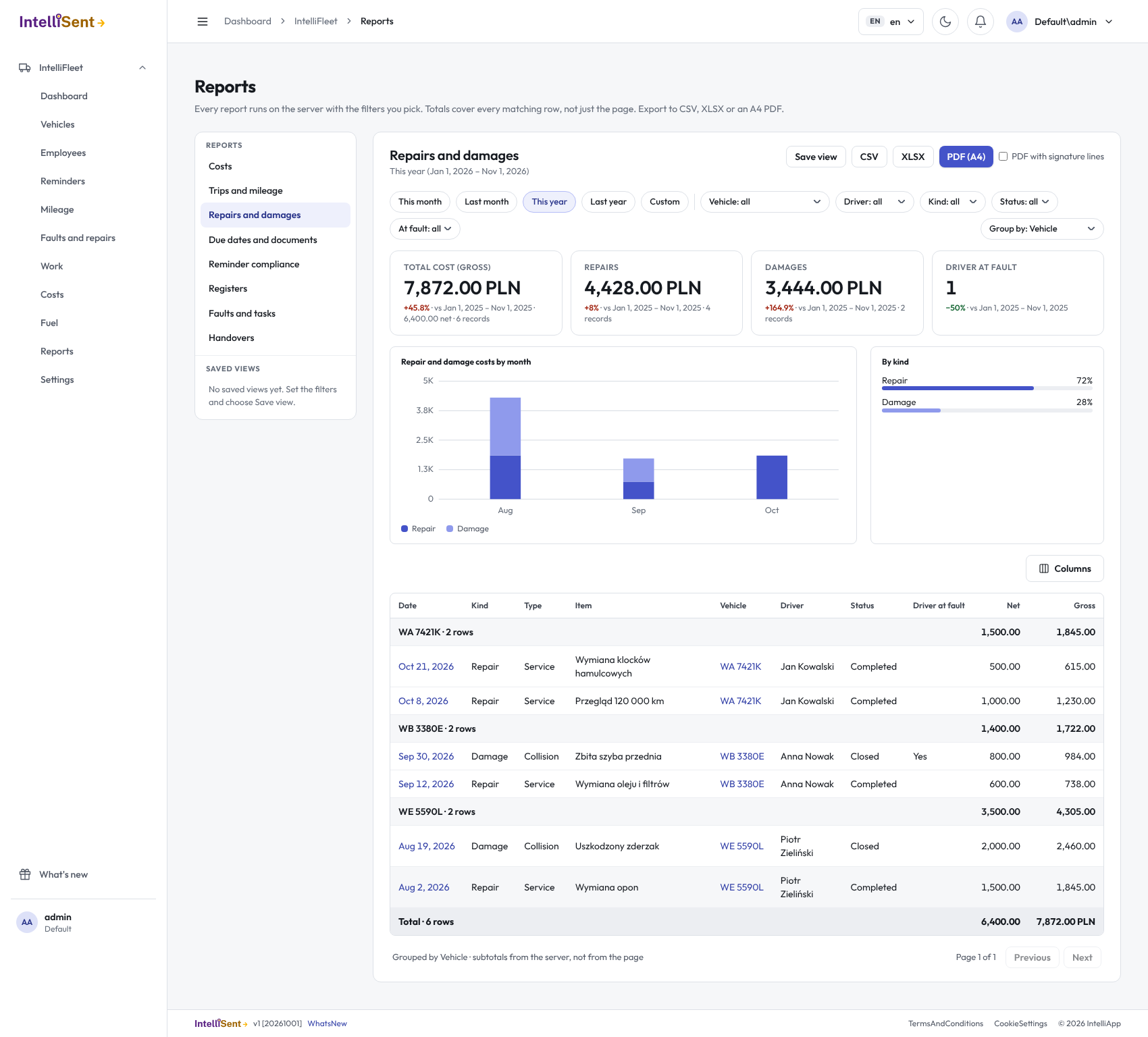
Repairs and damages
Every repair and every damage of the period, in one table. Rows are placed in the branch the vehicle belonged to on the repair or incident date. The report adds up one currency at a time and starts with your company's currency.
- Filters: period, Vehicle, Driver, Currency, Type (repairs or damages), Status (open or closed: a repair is closed when completed, a damage when closed) and Driver at fault (yes or no, damages only).
- Tiles: Total (gross, with net and the number of rows), Repairs, Damages and Driver at fault (damages the driver is at fault for).
- Chart: gross cost per month, repairs against damages.
- Columns: date, type, repair type, description, vehicle, driver, status, driver at fault, branch, fleet, workshop, odometer, next service odometer, insurance claim number, location, notes, net, VAT and gross, and the custom fields of the vehicle, the driver and the repair.
Due dates and documents
Everything the Reminders know a date or odometer reading for: insurance, inspections and other deadlines, documents, equipment, fuel cards, tyres, calendar events, financing agreements, and employees' driving licences and deadlines. It is the Reminders page as a report, so it shows the same items in the same state.
- Filters: period (on the due date; items due by odometer have no date and show only while the period is open, which is how the report starts), Vehicle, Driver, State (overdue, due soon, due, later), Kind (insurance, inspections, documents, employees, financing, repairs, low stock, other) and Acknowledged.
- Tiles: Overdue, Due soon, Due and Acknowledged. They show today's state, so they have no comparison with a period before.
- Chart: items per month of the due date, overdue ones against the rest. With an open period it shows six months back and a year ahead.
- Only active vehicles and active employees have items. Each row opens the record the item comes from.
Registers
Plain lists with export, no chart and no period. Pick the Register:
- Vehicles: registration number, make and model, type, status, branch, fleet, driver, VIN, model year, first registration, engine capacity, fuel type and owner. Filter by Status.
- Employees: name, number, branch, status, driver, phone, address, e-mail, driving licence and its expiry. Filter by Status. A fleet in the header leaves no employees, as an employee belongs to no fleet.
- Fuel cards: card number, name, provider, expiry (with a mark for expired cards), vehicle and driver.
- Stock: item, unit, quantity, reorder level and a mark for items at or below it.
- Drivers of the vehicles: from assignment history, each row a driver of a vehicle with the dates and the number of days (the current driver has no end date).
Each register needs its own permission; you open the first one you may see.
Faults and tasks
The fault reports (faults and damages reported from the phone or the desk) and the tasks that belong to a vehicle, with how long each waited and how long a fix took.
- A fault is open until it is closed: a rejected fault is closed on the day it was decided; a fault turned into a repair is closed when the repair is completed, into a damage when the damage is closed, into a task when the task is done.
- Days open is how long an open item has waited, up to today. Days to fix is the time from report to the closing of an item that was fixed; a rejected fault or a cancelled task was not fixed and has none.
- Filters: period (on the day reported), Vehicle, Reported by, Type (fault, damage report, task), Status (open or closed) and Category (the fault's category; tasks have none, so choosing one leaves them out). Group by category gives a subtotal per category, and the hidden Off the road column marks faults the driver said cannot be driven.
- Tiles: Total, Open (with the oldest), Days to fix (average) and Overdue tasks. Tasks without a vehicle belong to no branch and are not listed.
Reminder compliance
For each branch and kind of item (insurance, inspections, documents, employees, financing, repairs, low stock, other): how many items are tracked, how many are overdue, due soon, due or later, how many are acknowledged, and the compliance, which is the share of tracked items that are not overdue. It reports today's state and has no period. An employee's item counts in the employee's branch, a vehicle's in the vehicle's. Items by odometer count once they are inside their reminder window.
- Filters: Vehicle, Driver and Kind. Group by branch or kind gives subtotals.
- Tiles: Compliance (overall), Overdue, Due soon and Acknowledged.
Handovers
Who had which vehicle when: every handover and return, with the odometer, the fuel level and the new damage found. A return is a handover with no receiving employee.
- A vehicle is out when its latest signed handover is not a return; that row is marked.
- Filters: period, Vehicle, Driver (giving or receiving), Type (handover or return), Channel (phone or desk), Status (signed, draft, cancelled; cancelled ones show only when asked for) and Out now. Out now ignores the period, as it is today's state.
- Tiles: Handovers, Returns, Out now and New damage.
- Chart: handovers against returns per month.