
Documentation / Getting started and setup
Usage and limits
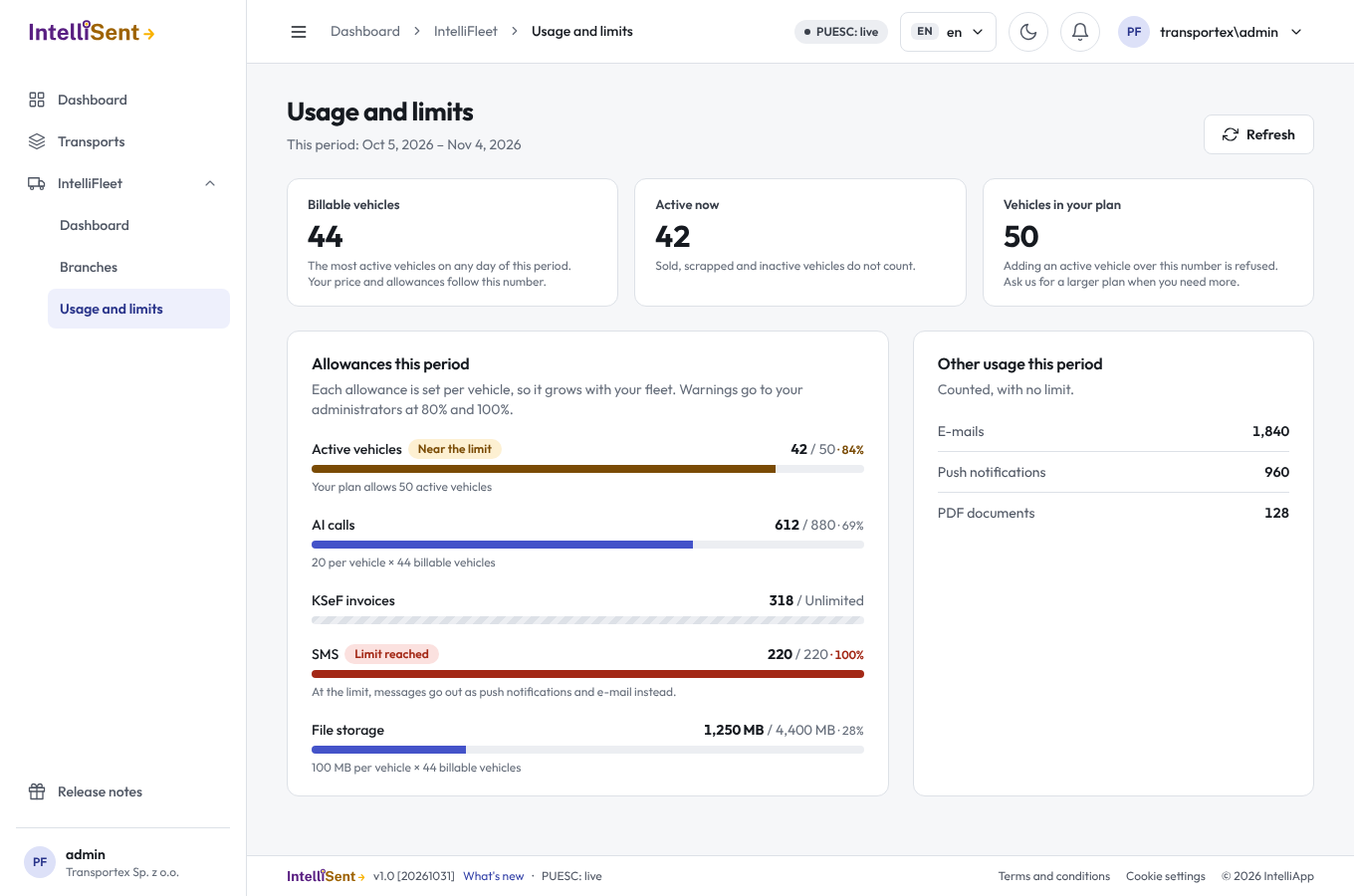
IntelliFleet is priced per vehicle. The page IntelliFleet > Usage and limits shows how many vehicles count for your bill this period and how much of each allowance you have used.
Who can see the page
In Administration, then Roles, the permission Usage and limits under IntelliFleet shows the page. Warnings go to the users in the Admin role, whether or not they have this permission.
Your period
The period is your subscription month. It starts on the day of the month your company signed up, so a company that signed up on the 5th has periods from the 5th to the 4th of the next month. The dates are shown under the page title.
Vehicles
- Billable vehicles is the highest number of Active vehicles on any day of the period. Your price and allowances follow this number. A vehicle you sold on the 20th still counts for that period, because it was Active earlier in the month.
- Active now is today's number. Sold, scrapped and inactive vehicles do not count.
- Vehicles in your plan is your plan's vehicle band. Making a vehicle Active when the band is full is refused with a message: set another vehicle to inactive, sold or scrapped, or ask us for a larger plan.
An inactive vehicle is read-only until you make it Active again, so it is not a way to keep using a car outside the plan.
Allowances
Each allowance is set per vehicle, so it grows with your fleet without a plan change. Your limit for the period is the allowance per vehicle times your billable vehicles. For example, 20 AI calls per vehicle and 44 billable vehicles give 880 AI calls.
| Allowance | What counts | At 100% |
|---|---|---|
| AI calls | Each invoice matched by AI and each photo read by AI | Invoices are matched by your rules only, and photo data is typed in by hand |
| KSeF invoices | KSeF purchase invoices given to the fleet | Nothing is blocked; we contact you about a larger plan |
| SMS | SMS segments sent to drivers and employees | Messages go out as push notifications and e-mails instead; see SMS |
| File storage | The size of all files you keep: photos, scans and documents | Nothing is blocked; we contact you about a larger plan |
| E-mails | Every e-mail IntelliFleet sends: reminders and scheduled reports (one per recipient) | Scheduled report e-mails stop and their owners are told; reminders still go out |
Unlimited means your plan sets no limit for it. Handovers, fault reports and reminders are never blocked by a limit.
The Other usage this period card counts push notifications and PDF documents. They have no limit.
Monthly statements
The card Monthly statements at the bottom of the page lists what IntelliFleet costs you, one line per calendar month. A month's statement is written shortly after the month ends (midnight UTC), so it counts calendar months, not the subscription months of the meters above.
- The amount is the month's billable vehicles (the most Active vehicles on any day of that month) times your plan's price per vehicle. A small fleet pays at least the plan's minimum fee, which the line then says.
- Over an allowance shows each allowance the month went over, such as AI calls 45 / 30. It is shown so you can see it coming, and it is not charged.
- A statement never changes once written. If a month's figures change afterwards, a correction is added as its own line with the new figures at the same price, and the amount it adds or takes away. The line it replaces is marked Replaced by a correction.
Warnings
When something reaches 80% of its limit, and again at 100%, every administrator gets a notification under the bell. Each warning comes once per period; a new period starts afresh. The bars show the same: amber with Near the limit from 80%, red with Limit reached at 100%.
For the IntelliSent team
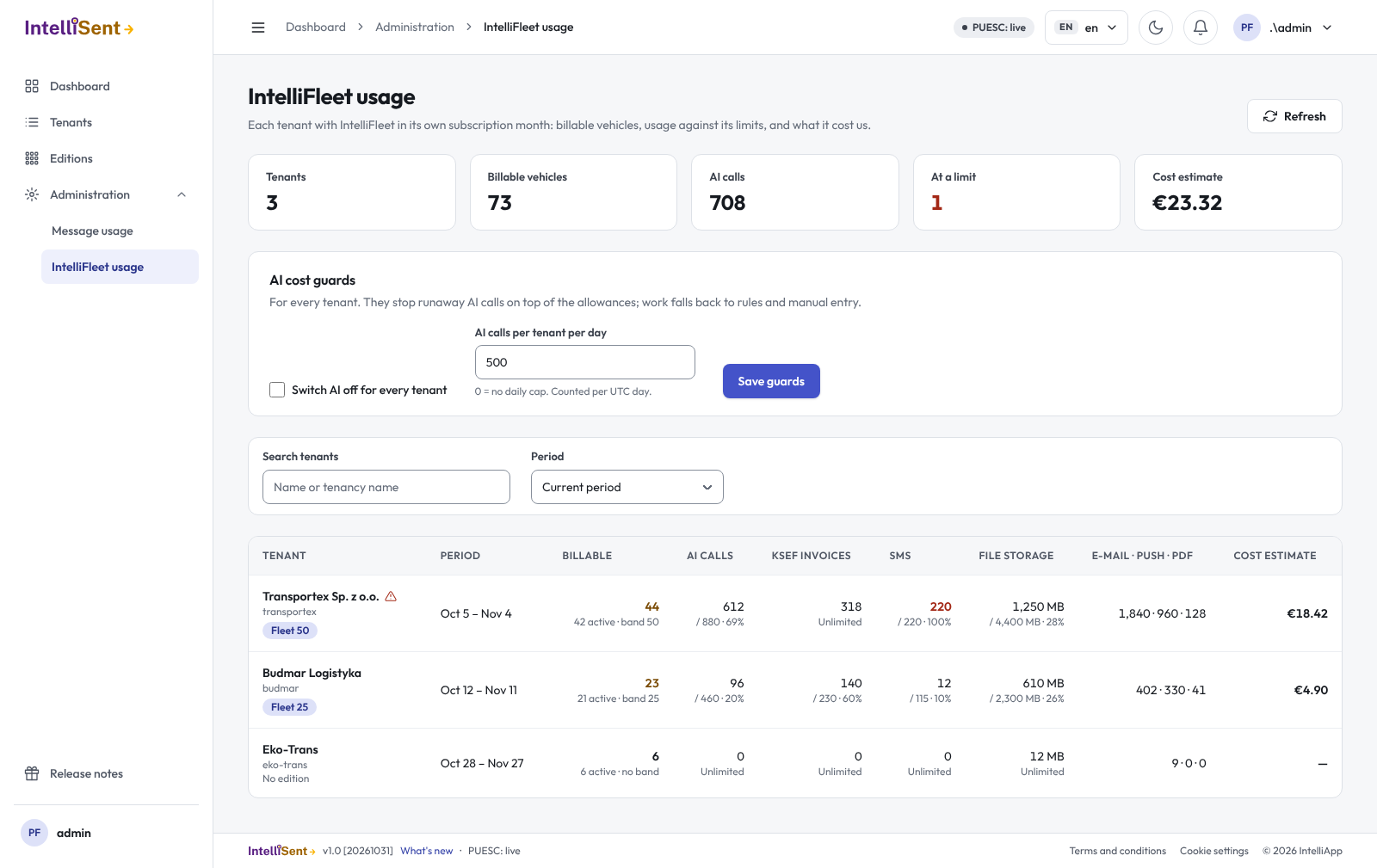
The host page Administration > IntelliFleet usage lists every tenant with IntelliFleet in its own subscription month: billable vehicles, each allowance with its use, e-mails, push notifications and PDFs, and the estimated cost to us. The tiles above the list total them. Search by name or tenancy name, and pick an earlier period in Period. A warning sign marks a tenant near or at a limit.
AI cost guards apply to every tenant on top of the allowances:
- Switch AI off for every tenant stops AI matching and photo reading at once, for example when the AI provider misbehaves. The work falls back to rules and manual entry.
- AI calls per tenant per day caps one tenant's AI calls per UTC day (500 to start with; 0 = no cap), so a loop or abuse cannot run up a bill.
The limits themselves are edition features under IntelliFleet in Editions: Maximum active vehicles, and the allowances per vehicle. 0 means unlimited.
Billing statements at the top of the host usage page opens every tenant's statements for one calendar month: pick the month and search by name. The tiles total the tenants billed, their billable vehicles and the amount to invoice per currency; each total takes a tenant's latest line, so a correction replaces its statement there. Export CSV downloads the lines (statements and corrections, with plain numbers and ISO dates) for invoicing in the accounting tool. Nothing is charged automatically and use above an allowance is never billed.
The prices are edition features under IntelliFleet in Editions too: Price per vehicle per month, Price currency and Minimum monthly fee. Three editions are created to start with, IntelliFleet Start, Standard and Pro, with placeholder prices to change before the first invoice; they are created only when missing, so changed values stay. A changed price applies from the next statement written; statements already written keep theirs.