
Documentation / Costs, invoices and reports
AI matching of invoices
AI matching suggests a vehicle and how to book an invoice line when no rule could tell. It works in the invoice inbox (see Invoice inbox): rules suggest first, and AI looks only at the lines they left open. You still confirm every invoice; nothing is booked by AI.
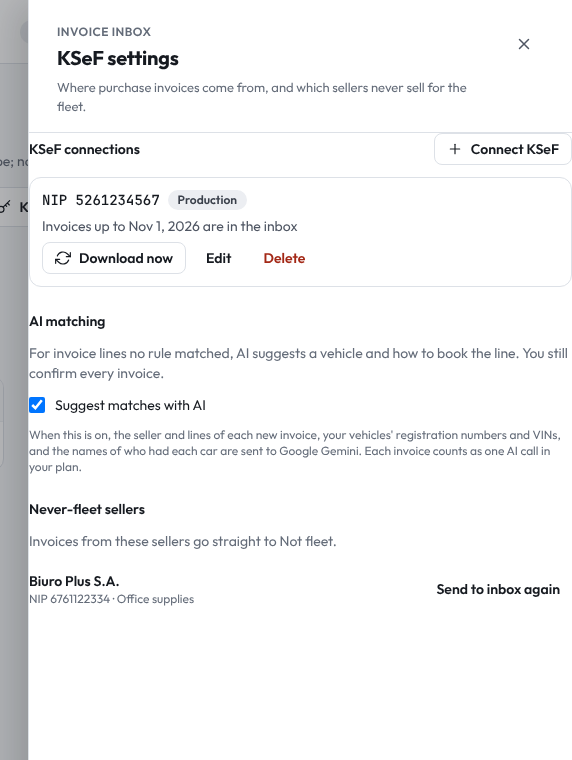
Turning it on
AI matching is part of the AI invoice matching feature of your plan, and it is off until your company turns it on, because invoice content leaves IntelliFleet. A user with Connect KSeF opens Invoices, clicks KSeF settings and ticks Suggest matches with AI under AI matching. Untick it to stop. Without the feature in your plan the section is not shown.
When it is on, for every new invoice with lines no rule matched, IntelliFleet sends Google Gemini:
- the invoice's seller, NIP, number, dates and amounts, and the open lines (description, quantity, unit, net);
- your vehicles' registration numbers, VINs, makes and models, and the names of who had each car on the sale date;
- your expense types and the open repairs.
The invoice's own address data and your other records are not sent. Invoices that came in before you turned it on keep the suggestions they had.
What AI suggests
For each line it can match, AI picks one vehicle from your list and one of:
- Repair: workshop work and parts, optionally attached to an open repair of that vehicle;
- Fuel entry: fuel bought in litres;
- Other expense: anything else, with the expense type that fits best.
The inbox shows the suggestion as AI with how sure it is (for example AI 87%) and a one-line reason. Check it, change what is wrong and confirm, as with any suggestion. A line AI is not sure about stays empty for you to fill in.
AI can only pick from your own vehicles, expense types and open repairs. An answer that names anything else, or that is not in the expected form, is dropped, so a wrong guess never turns into a vehicle you do not have.
What counts against your plan
Each invoice sent to AI counts as one AI call, whether or not AI found a match. AI calls are shared with reading registration certificates from a photo and are shown under Usage and limits. Your plan includes a number of AI calls per vehicle per period.
AI matching stops, and suggestions come from rules only, when:
- this period's AI calls are used up;
- today's AI calls reach the daily cap;
- AI is switched off for all companies (for example during a provider outage);
- AI is not set up on the server.
KSeF settings then says why under AI matching. Invoices keep arriving and you can book them as usual.